Scyva
Progression Assistance and fight feedback
Iris checks catalyst explosions, failed Ignite Core checks and early Stasis Swarm Droid kills in Master Mode (NiM).
Getting started
Open Displays in the main parser and enable Progression Assistance. Recorded failures stay throughout the pull and remain visible afterward, with timestamps measured from the start of the fight.
The overlay works with voice callouts turned off.
Catalyst explosions
When a catalyst explodes, Iris shows its colour and the lowest DPS among the DPS players who attacked it.
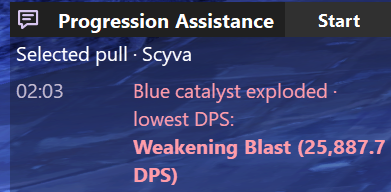
If only one DPS attacked it, the overlay names them and says only one DPS went to that catalyst.
Ignite Core failures
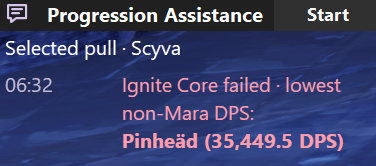
When Ignite Core fails, Iris names the lowest DPS during the shield, excluding Marauders and Sentinels.
Early droid kills
During the OPD phase, the overlay shows when to kill a Stasis Swarm Droid and the time until the expected beam. Kill appears in red. Don’t kill appears in gray.
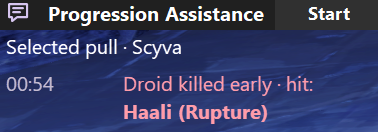
For an early droid kill, Iris names the player and ability, and shows whether it was a direct hit, DoT or reflected damage.
Saved logs and fight feedback
All three failure checks work with saved logs. Load the original combat log, select a Scyva pull, then open Deaths → Fight Feedback to load its review. The same findings also appear in Progression Assistance.
Set the display Data source to Selected fight if the overlay is showing another pull. The OPD countdown and Kill / Don’t kill instructions appear during live parsing.
Fight Feedback includes findings up to the selected death, including earlier failures in the pull. Select a later death to review what happened afterward.