Nahut
Progression Assistance and fight feedback
Iris checks turret failures, coupling DPS, candle passes and missed Rebounders in Master Mode (NiM).
Getting started
Open Displays in the main parser and enable Progression Assistance. Findings stay throughout the pull and remain visible afterward. Timestamps show the time since the fight started.
During live parsing, the overlay also shows the next candle and Rebounder assignments. Set your team’s characters and Nahut roles in Players and roles, then choose Save and use team. Candle orders can be changed there too.
The overlay works with voice callouts turned off.
Turret failures
Iris tracks the pull-ins and checks whether each turret went in on time. A failed turret is shown with its job and clock location:
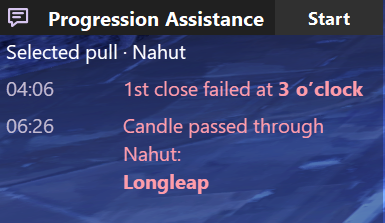
If the group chooses an alternate turret for fifth, a gray “Went to 6th” note shows its clock location.
Coupling DPS
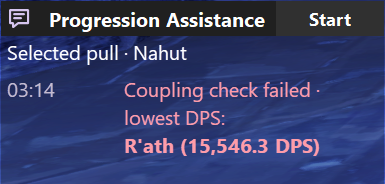
When the coupling check fails, the overlay names the DPS with the lowest damage per second across the couplings.
Candle passes and Rebounders
If the candle passes through Nahut, Iris names the passer.
With team assignments configured, Iris also shows incorrect candle recipients and names the assigned player when a Rebounder is missed.
Saved logs and fight feedback
Load the original combat log and select a Nahut pull to review turret failures, coupling DPS and candle passes through Nahut. Set the display Data source to Selected fight if the overlay is showing a different pull.
Wrong-recipient and missed-Rebounder findings need the assignment captured during live parsing.
Deaths → Fight Feedback shows coupling health near the selected death and turret failures recorded up to that point. Select a later death to see later findings.